
Why this experiment
Headless analytics means that collecting and reporting data are decoupled. The data lives in your own storage, and you choose how to access it: via insights, a BI environment, or an AI assistant.
With MCP (Model Context Protocol) you connect that AI assistant to the tools you already use. The assistant is the front end, MCP is the plug.
If that is true, you should be able to measure other signals than visits through the same pipeline. Accessibility seemed like a good first test: public sector organisations must demonstrably keep track of it, and most do so today with separate tools. We tried it on 10 November 2026 on our own site, govanalytics.nl.
Setup and research question
Research question: headless analytics promises that measuring and reporting are decoupled, and that you can access the data from any front end. But does that also work the other way round: can you use the Govanalytics MCP to steer other services in order to set up a measurement? And can you then create the reporting ad hoc in the platform, without building a dashboard?
We tested that on accessibility. Public sector organisations must demonstrably keep track of it, and most do so with separate tools. Exactly the kind of signal that currently falls outside the analytics pipeline.
Setup: we placed one script on our own website govanalytics.nl. It loads axe-core, the open-source testing engine from Deque, only when you open a page with the parameter ?a11y=. The results are sent as events to the dataLayer and to Govanalytics. We then did all checking, configuration, and reporting from an AI assistant with MCP connections.
What we wanted to test, in four rulesets:
- Legal minimum (
?a11y=legal): EN 301 549 / WCAG 2.1 AA, the standard behind the accessibility statement. - Preview of WCAG 2.2 (
?a11y=wcag22): the same set plus the new criteria axe can test automatically. Right now that is one: the minimum size of click targets. - The consent banner (
?a11y=banner): the banner only, which the script opens and closes beforehand. - Text and readability (
?a11y=text): sentence length, long words, a readability indicator, link texts and alt texts, plus the axe rules for language, title and headings.
How we measured success:
- every page can be tested at any time with just a URL
- regular visitors do not load the test library
- results are readable per ruleset in Govanalytics, as insights
- the chain can be operated from a single conversation with the AI assistant, with a preview and your approval before each change
The building blocks: which MCPs work together
No single MCP does everything. The power is in the combination, and you decide the combination yourself. For this experiment we used two, with a third as an option. Checking the pages was done by the assistant in a browser, without a separate connection.
| MCP | Role in the chain | What the assistant does with it |
|---|---|---|
| Govanalytics | Measure and query | Retrieve properties and traffic, set up traffic filters, goals and insights |
| Consent Studio | Tag management and consent | Read Launcher tags and publication status, inspect templates and triggers |
| axe MCP Server by Deque (optional) | Optional: remediation | Suggest fixes in your developer’s code; part of the paid axe DevTools. Not used in this experiment |
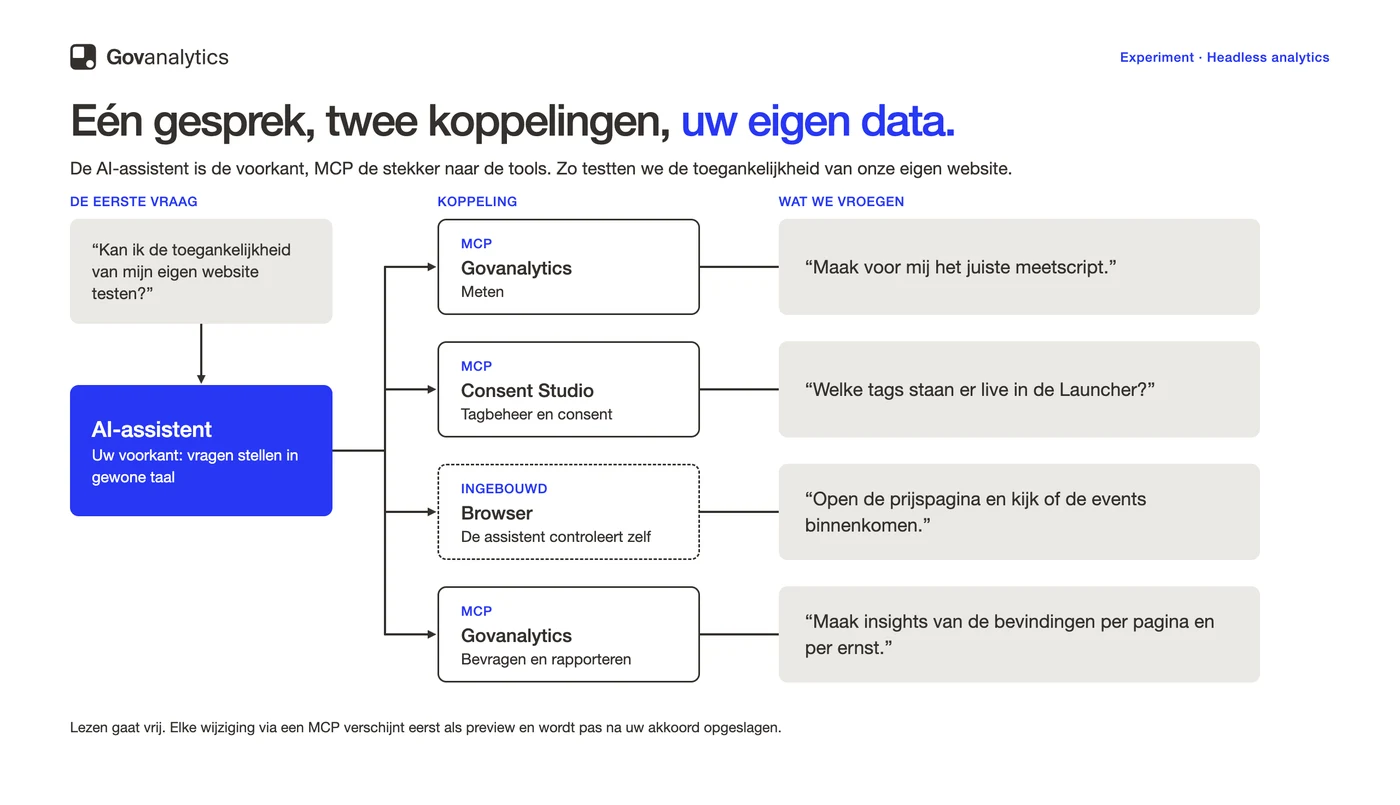
Changes always go through a preview or a dry run. Only after your approval is anything saved. The assistant reads freely, but writes only with your consent. For a public sector organisation that is not a minor detail: you keep oversight of every change in your measurement environment.
How we approached it: six steps
The experiment ran via a single conversation with an AI assistant, with one manual action. Each step includes the question we asked.
- Connected the MCPs. We added Govanalytics and Consent Studio as connectors and gave the assistant a browser. That is a one-time setup.
- Mapped the situation. “Which properties do we have, which tags are live in the Launcher and how did the site perform last week?” The assistant pulled the answer from both MCPs.
- Placed the script on the site. The assistant wrote the script and added it to our website’s code, so it is available on every page. We published it ourselves using our own deploy script: that was the only manual action. The script loads axe-core only when a page is opened with
?a11y=. - Verified in the browser. “Open the pricing page with ?a11y=wcag22 and check whether the events come in.” The assistant opened the page, read the dataLayer and network traffic, and reported what worked and what did not.
- Reporting without a dashboard. “Create insights with the findings per page, per severity and per ruleset.” The assistant created them via the Govanalytics MCP. For each insight we saw a preview first and gave our approval; only then did Govanalytics save it. This produced six insights without us building a single dashboard or report.
- Asked questions. “Which pages have findings with severity serious?” The assistant retrieved the answer directly from our own data.
This is what a finding looks like in the dataLayer, here from the pricing page (abbreviated):
{
  event: 'a11y_violation',        // event type: a violated rule
  a11y_page: '/pricing/',         // page on which the scan ran
  a11y_ruleset: 'wcag22',         // chosen ruleset, from ?a11y=wcag22
  a11y_rule: 'color-contrast',    // the axe rule that fails
  a11y_impact: 'serious',         // severity: critical, serious, moderate or minor
  a11y_wcag: 'wcag2aa,wcag143',   // WCAG level and criterion (here 1.4.3)
  a11y_nodes: 32                  // number of elements on the page with this issue
}
In Govanalytics the same finding arrives as an event with Label color-contrast, Level Name serious, Value 32 and Content Group wcag22. The insights are built on top of that.
What we found
All four rulesets worked: every page could be tested with just a URL, and results came through per ruleset in Govanalytics.
| Ruleset | Tested on | Outcome |
|---|---|---|
| Legal minimum | homepage, pricing page, an article, a comparison page | One issue dominates: insufficient colour contrast (WCAG 1.4.3), on 4 to 39 elements per page. In addition, the accessible name of “Hosted on” does not match the visible text (WCAG 2.5.3). No findings with severity critical. |
| WCAG 2.2 | homepage, pricing page | No additional findings: axe found no click targets that were too small. |
| Consent banner | an article page | Three findings, all serious: an icon link without text, nested interactive elements on the toggles, and a contrast of 4.45:1. These sit with the banner vendor, not with our site. |
| Text and readability | six pages | No vague link texts or missing alt texts. The readability indicator (Flesch-Kincaid) ranges from 30 on the comparison page to 68 on the article. Product pages have many long words; the article has many long sentences. |
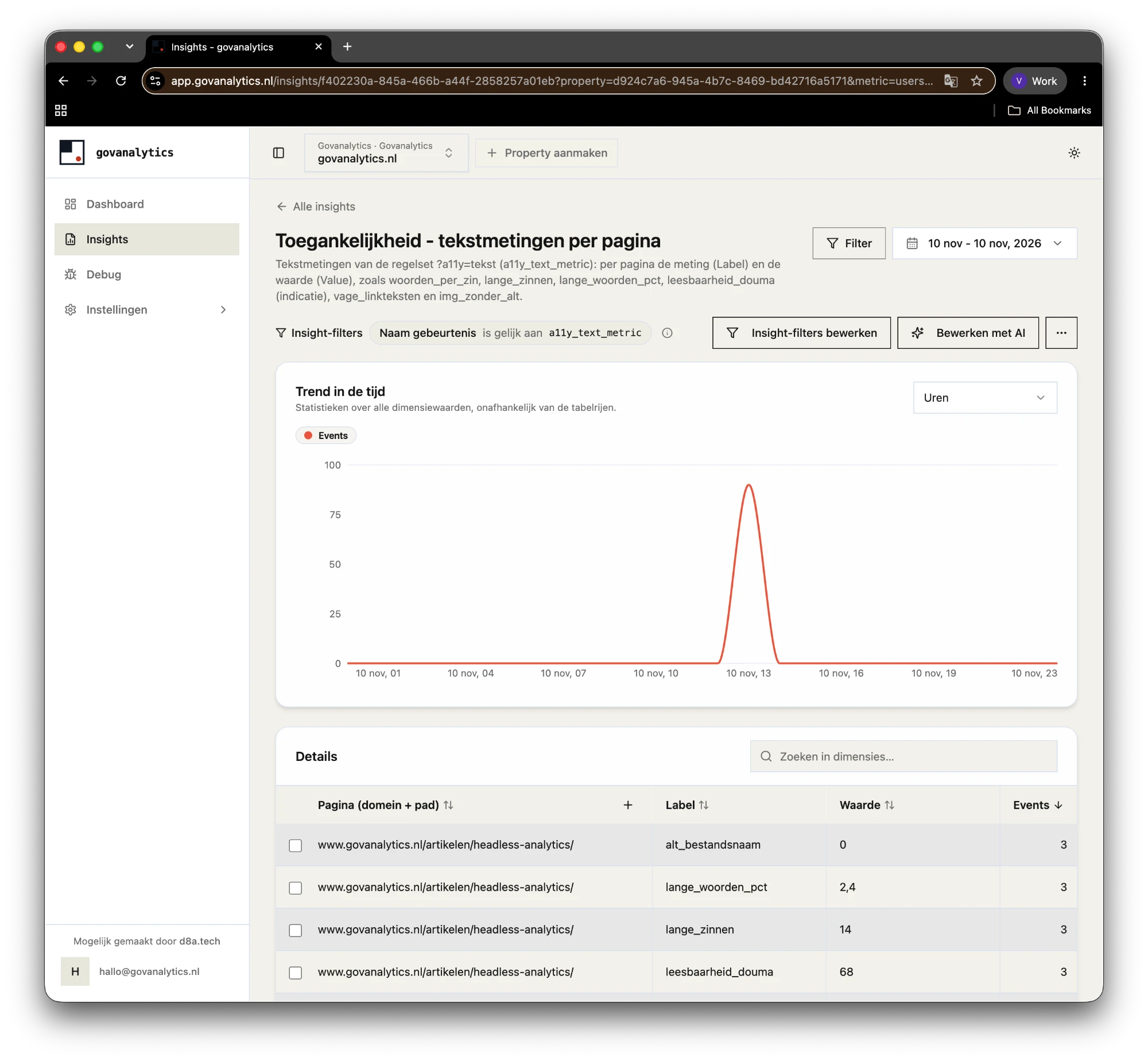
Two things surprised us. The number of findings depends on browser and screen width: on the pricing page we found 32 to 39 elements with insufficient contrast. And our own text measurement initially counted a hidden tracking pixel as an image without alt text. When you test like this, you are always testing the script itself too.
The answer to the research question
Yes. A new measurement signal turned out to be just another data stream in the same pipeline in headless analytics. We did not need to add a tool, dashboard or vendor. The caveats: an automated test only catches part of WCAG, and publishing code or tags remained manual work.
Accessibility is just one example. The same pattern works for other signals that are currently often in separate tools:
- form errors and abandoned requests
- searches with no results
- load times and Core Web Vitals
Because everything is in the same storage, you can also combine signals. An example: how many visitors this month saw a page with a finding of severity serious?
For your organisation this means fewer tools to manage, fewer vendors to contract, and fewer places where your data lives. The data remains yours and stays where you want it. Want to switch to a different dashboard or AI assistant later? You connect it to the same data.
Logical next steps
The experiment is a first version. These are the steps that logically follow, in the order we would take them.
1. Deploy via the Consent Studio Launcher
In this experiment the script sits in our site’s code. That works, but every change requires a new deploy. The logical next step is to put the script as a tag in the Consent Studio Launcher.
That delivers four things:
- Switch it on and off when it suits you. Via the Consent Studio MCP the assistant can enable or disable a Launcher tag, for example only during a test week or immediately after a release. This is currently possible for tags based on a template. A Custom HTML tag like our script you still enable or disable in the dashboard. Consent Studio is bringing out an update soon that lets you create your own tag templates. Our script then becomes a template, and the assistant can also switch this test on and off via the MCP.
- Change without a deploy. Adjusting a ruleset, enabling a sample, or disabling the test happens in the Consent Studio Launcher.
- Consent in one place. The tag follows the same consent rules as your other tags.
- Reusable. The same tag works on every site where the Launcher runs.
One lesson from the experiment: a Custom HTML tag you place and publish in the Launcher dashboard. Via the MCP connection the assistant can prepare the tag and read the workspace, but cannot publish such a tag live.
2. A sample with real visitors
Right now the scan only runs when we open a page with ?a11y=. The script can also run for a small share of visitors, for example 2 to 5 per cent, and only when the browser has nothing else to do. Then you measure on real screens, browsers and zoom levels. Keep the sample small: axe-core is a substantial library.
3. Scanning after interactions
Axe only sees what is on screen. An expanded FAQ, a different state of the pricing toggle or an open mobile menu currently stay out of sight. With a trigger on a click or a dataLayer event you can scan those states too.
4. A weekly check as a scheduled task
In Claude, or another AI assistant with MCP connections, you set up a scheduled task that retrieves the insights from Govanalytics via the MCP every week and only reports what is new or worse, for example after a release. That way nobody has to think about it.
5. Having the AI assistant assess language level
The script measures objective text characteristics, but does not say whether a text is at plain language level. The AI assistant we used throughout the experiment can read a page and assess it for language level and jargon. That remains an indication: real assessment requires readers or a language specialist. The outcome connects well with an SEO or content process: pages with long sentences or lots of jargon automatically end up on the rewrite list, and clear text also helps search engines and AI answers to understand your page.
6. The same setup for clients
The chain is not tied to our own site. Wherever Govanalytics and the Consent Studio Launcher run, the same approach works, with your own properties and your own pages.
Accessibility in brief
Accessibility in brief
-
axe-core automatically tests a subset of WCAG criteria, such as contrast, alt texts, labels and ARIA. Keyboard navigation, focus order and use with a screen reader remain manual work.
-
Start with EN 301 549 / WCAG 2.1 AA, the standard behind the accessibility statement. Add WCAG 2.2 AA if you want to look ahead: EN 301 549 version 4 adopts nine criteria from WCAG 2.2. You can also run the scan only on your consent banner.
-
No. Since 1 October 2026 public sector organisations in the Netherlands use the mandatory model for the accessibility statement, with research according to WCAG-EM or an equivalent method. This scan is the signal between two audits.
-
Not if you only run the scan with a parameter in the URL, or in a small sample when the browser has nothing else to do.
Try it yourself
The experiment took us less than half a working day, this article included. The script is ready and the steps have been tested.
Want to try it on your own website? We will walk through the six steps with you once, using your own properties and pages. Request a demo

